Walk through the workbook
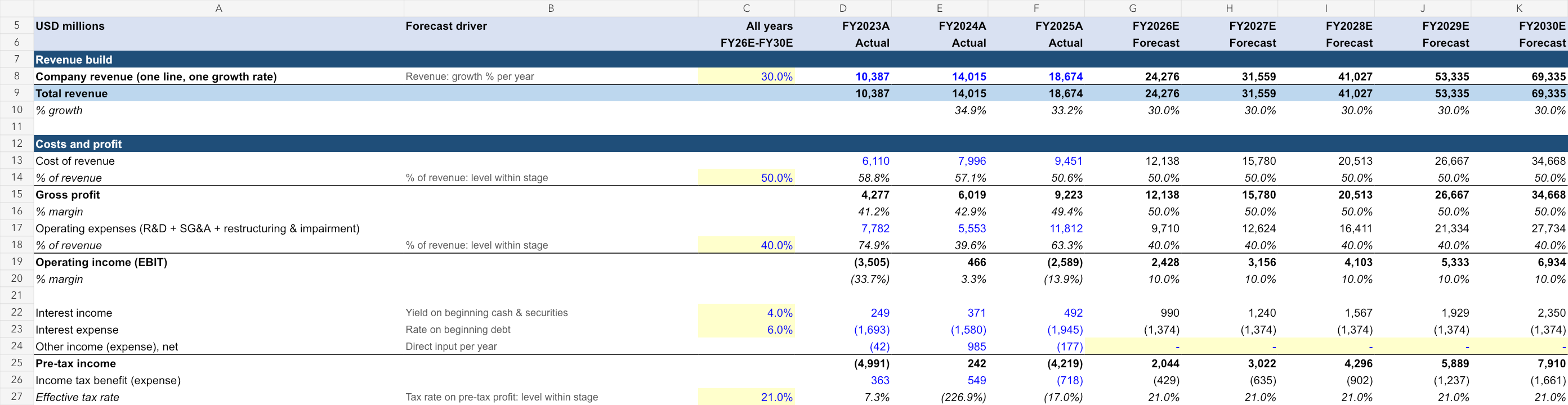
- Start with the Income Statement. Read the source and assumption notes. Blue numbers are hardcoded, yellow shading marks editable assumptions, green cells link to another tab and black cells calculate a result.
- Change one assumption. Adjust the yellow revenue growth input and compare the five modeled years. This simplified workbook keeps a single growth rate across the forecast; it does not separate segments or volume and pricing.
- Follow the Balance Sheet and Cash Flow. See how capital expenditure, depreciation and working capital connect profit to cash generation. Read the notes explaining the flat ratios.
- Finish with DCF Valuation. Inspect discounted cash flows, the terminal assumptions and the sensitivity tables. Change the discount rate or terminal growth to see how much the conclusion depends on them.
These are written workbook instructions. A separate video walkthrough has not been released.